Punch Assist is the shift assistant that moves your finish time when you take a break, works from your notification, and keeps every hour private on your phone.
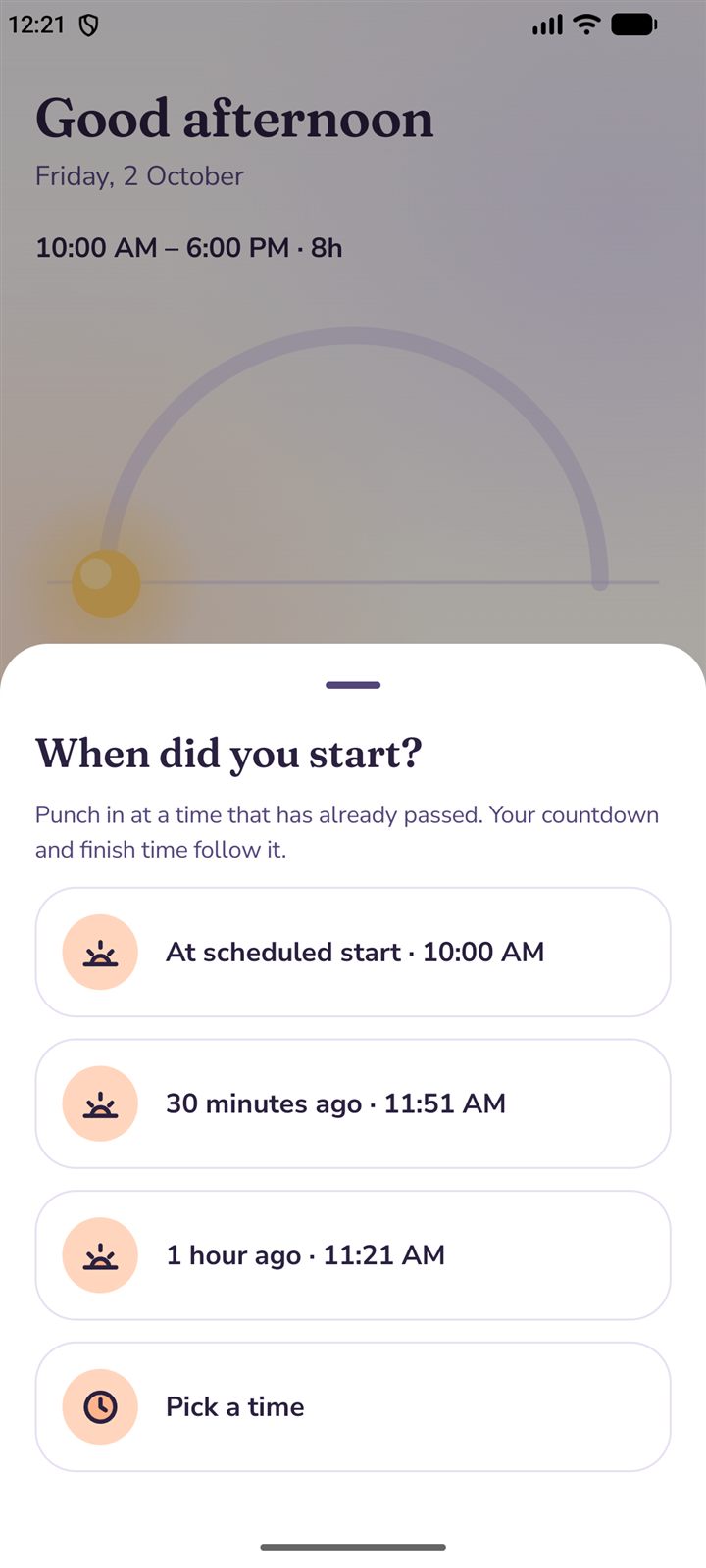
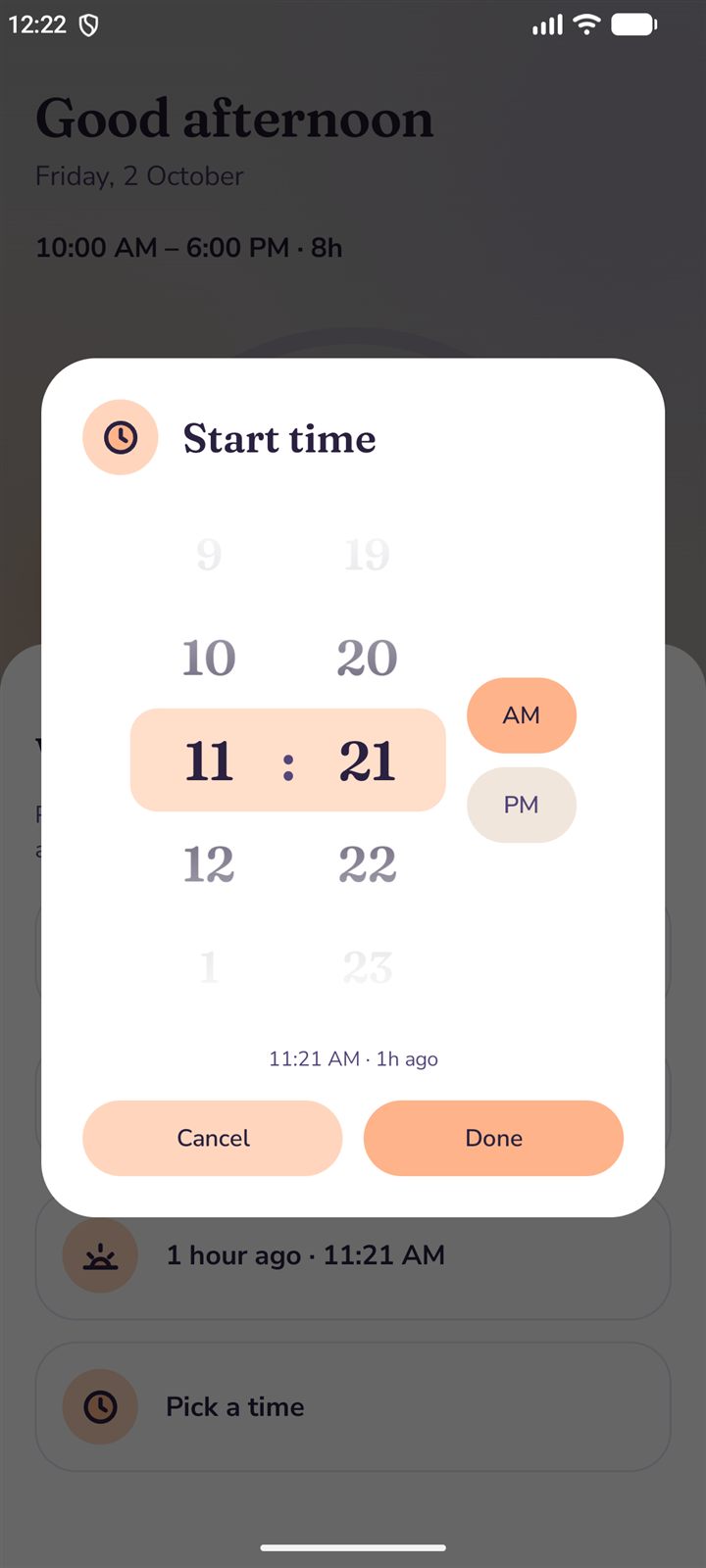
Punch in from the app, the notification, a home-screen widget or a Quick Settings tile. Began before you opened the app? Choose your scheduled start, half an hour ago, or any time you pick on a wheel. The countdown follows.
App
Notification
Widget & tile
10:35 AM
Then the day counts itself down.
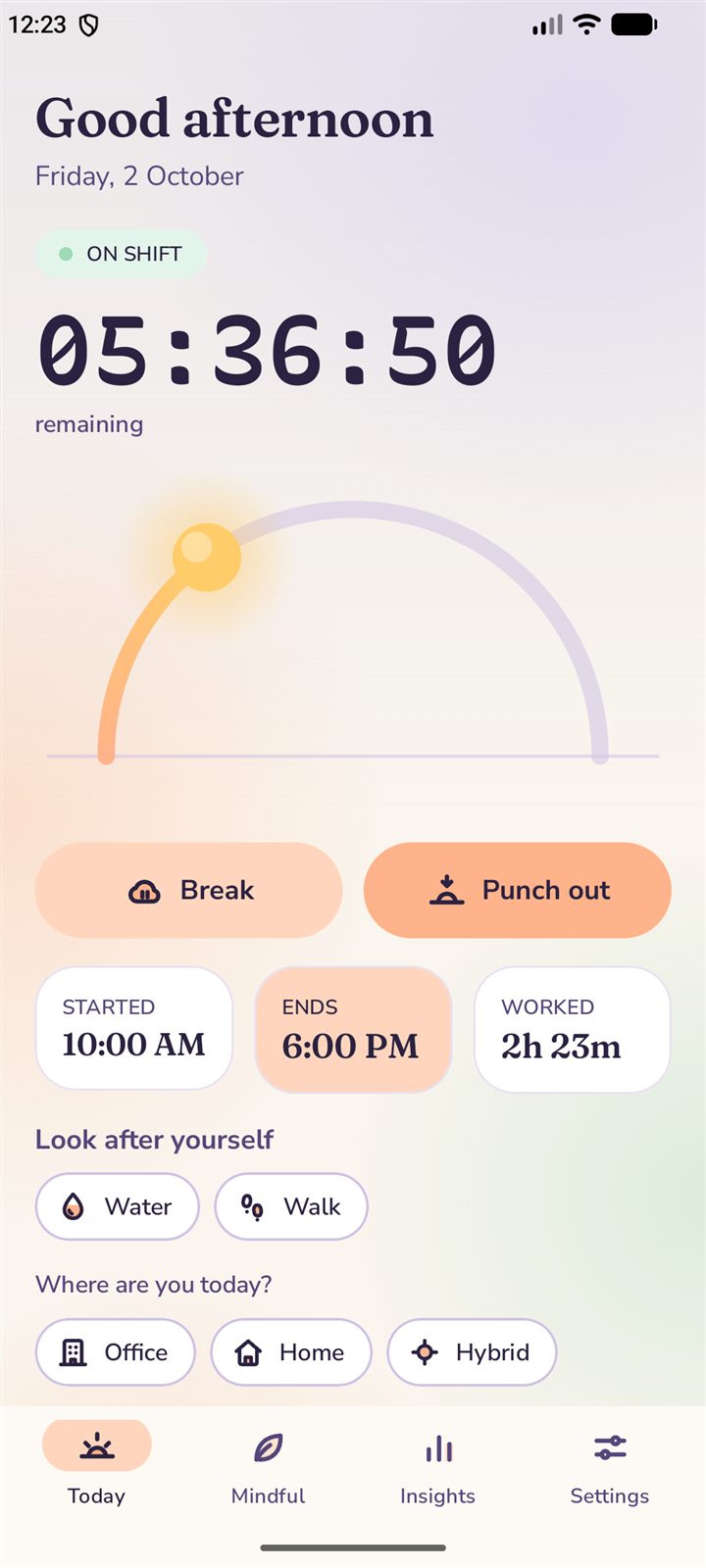
A calm countdown, a sun that crosses the sky as your shift passes, and a finish time you never have to work out. It keeps counting with the app closed, because the timer lives in the notification.
Always accurate
Survives a restart
No battery drain
1:15 PM
Take a break. Your finish time follows.
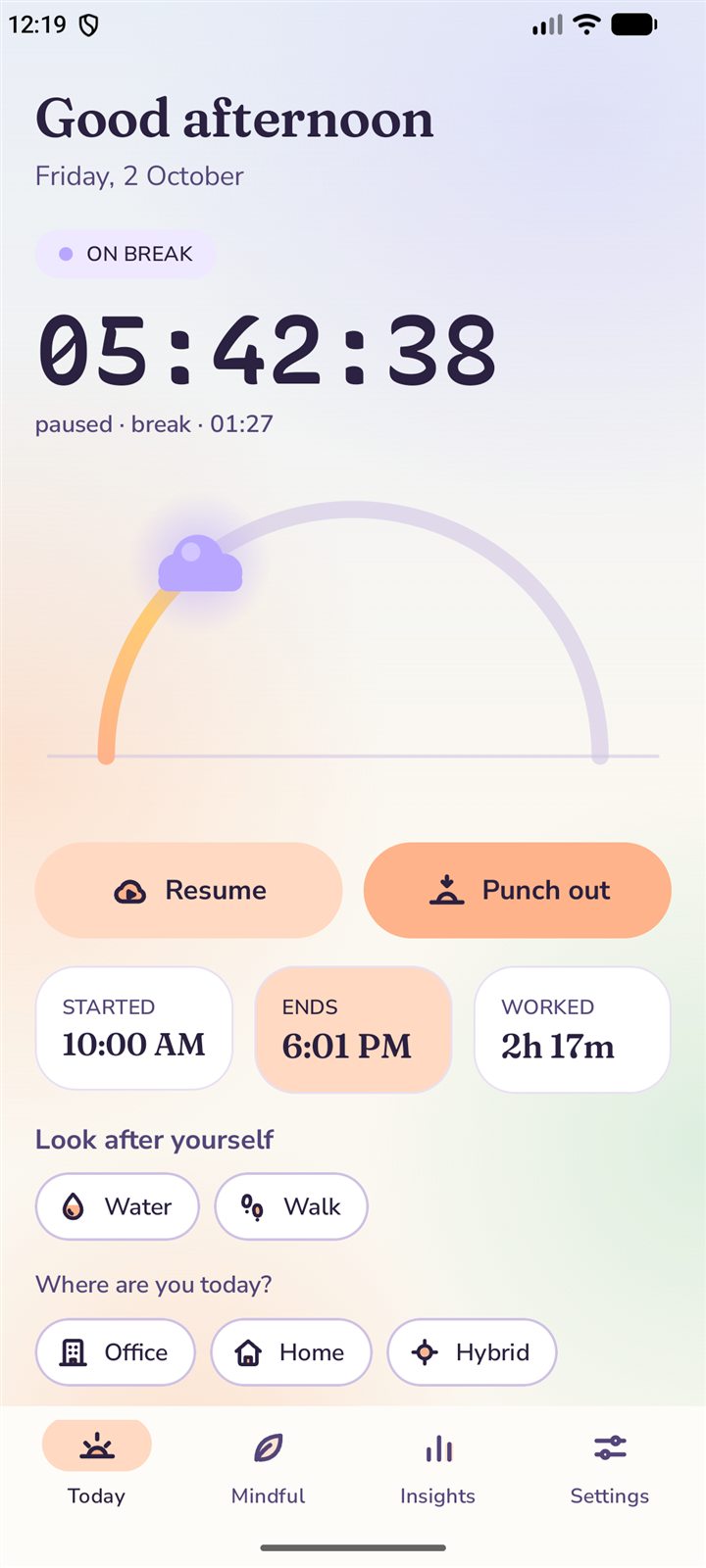
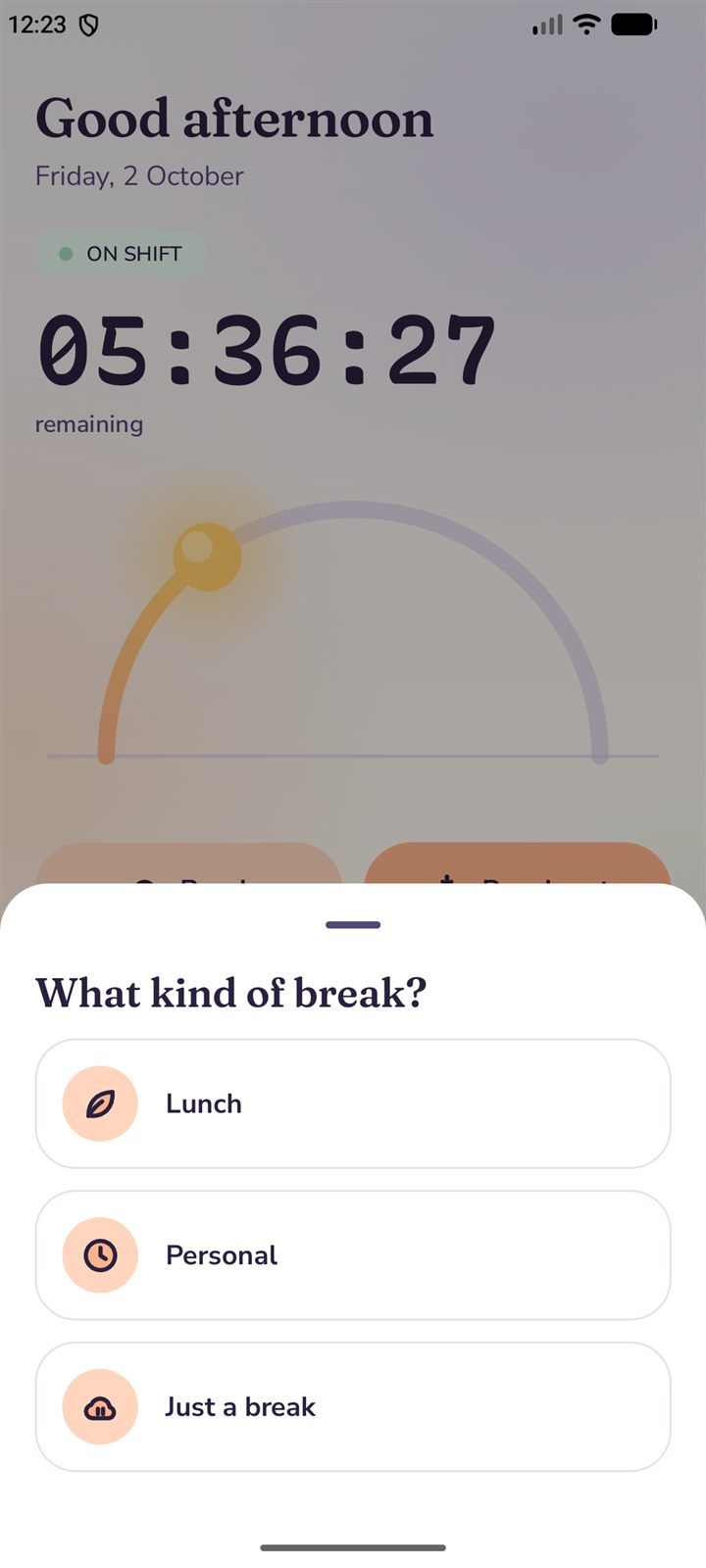
A break pauses your work and moves your finish time later by exactly the same amount, so lunch is never counted as lateness. The sun even tucks behind a cloud until you are back.
Lunch
Personal
Just a break
6:05 PM
When your day ends, it ends.
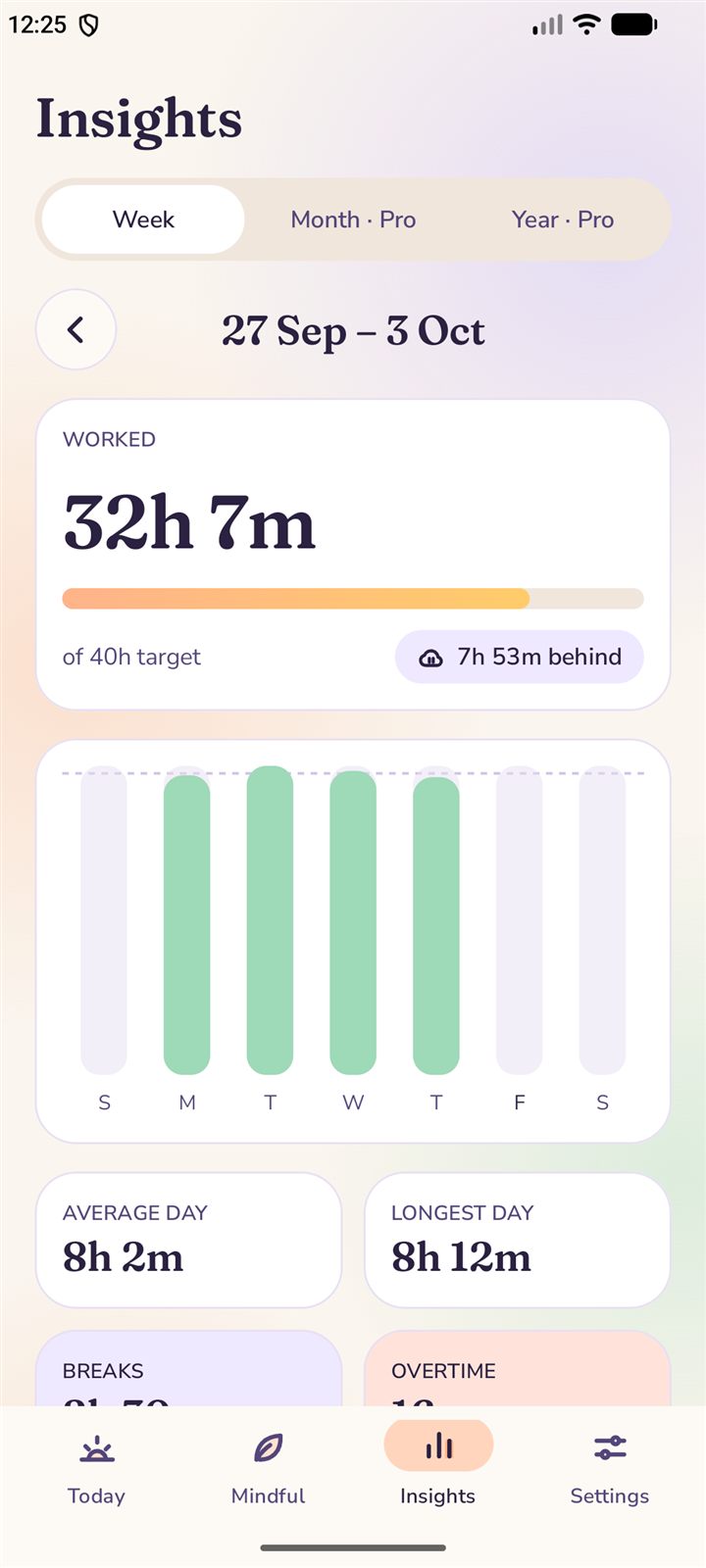
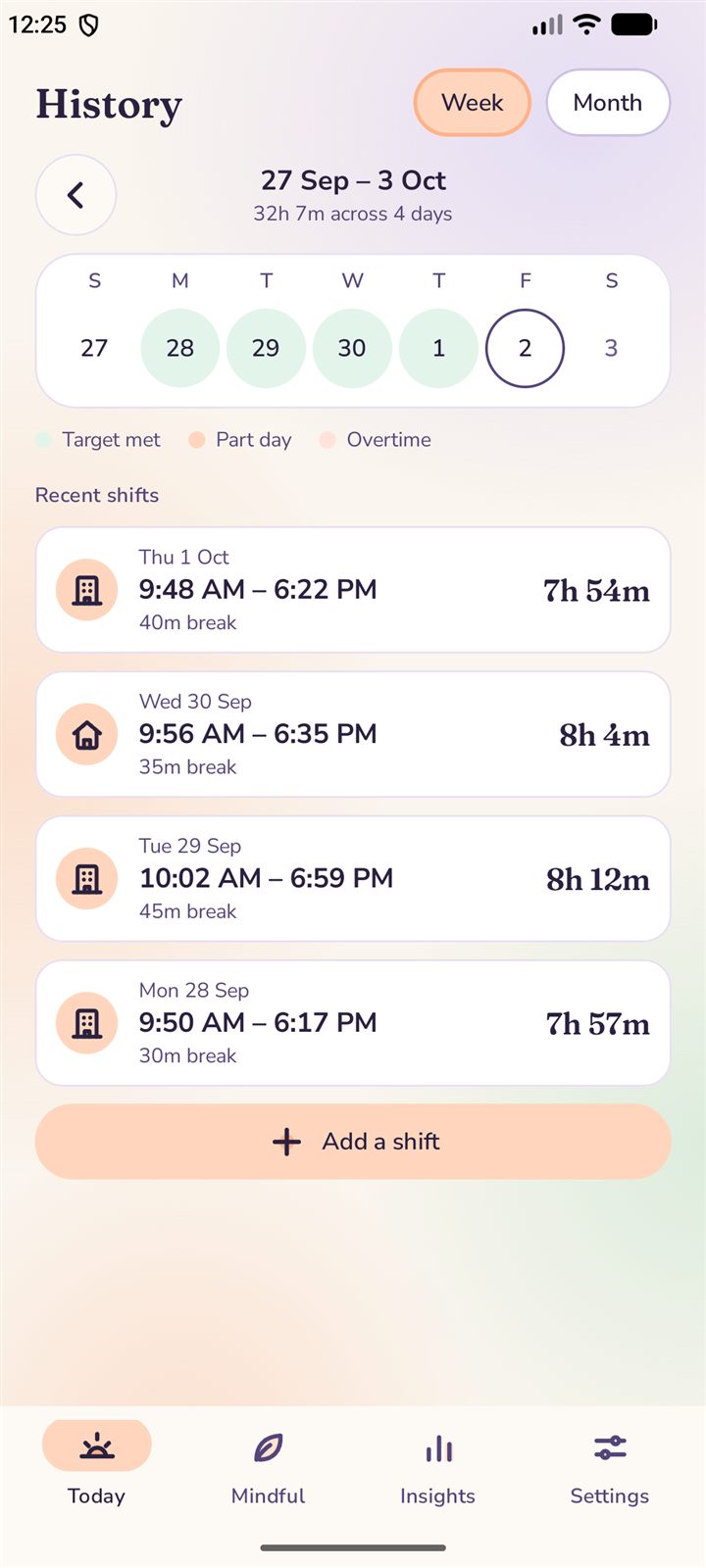
Every shift is kept. See your week at a glance: hours against your target, your longest day, breaks and overtime, with target-met days, part days and overtime in colour. Forgot to punch out? Say when you finished.
Week
Month · Pro
Year · Pro
8:40 PM
Then a minute to breathe.
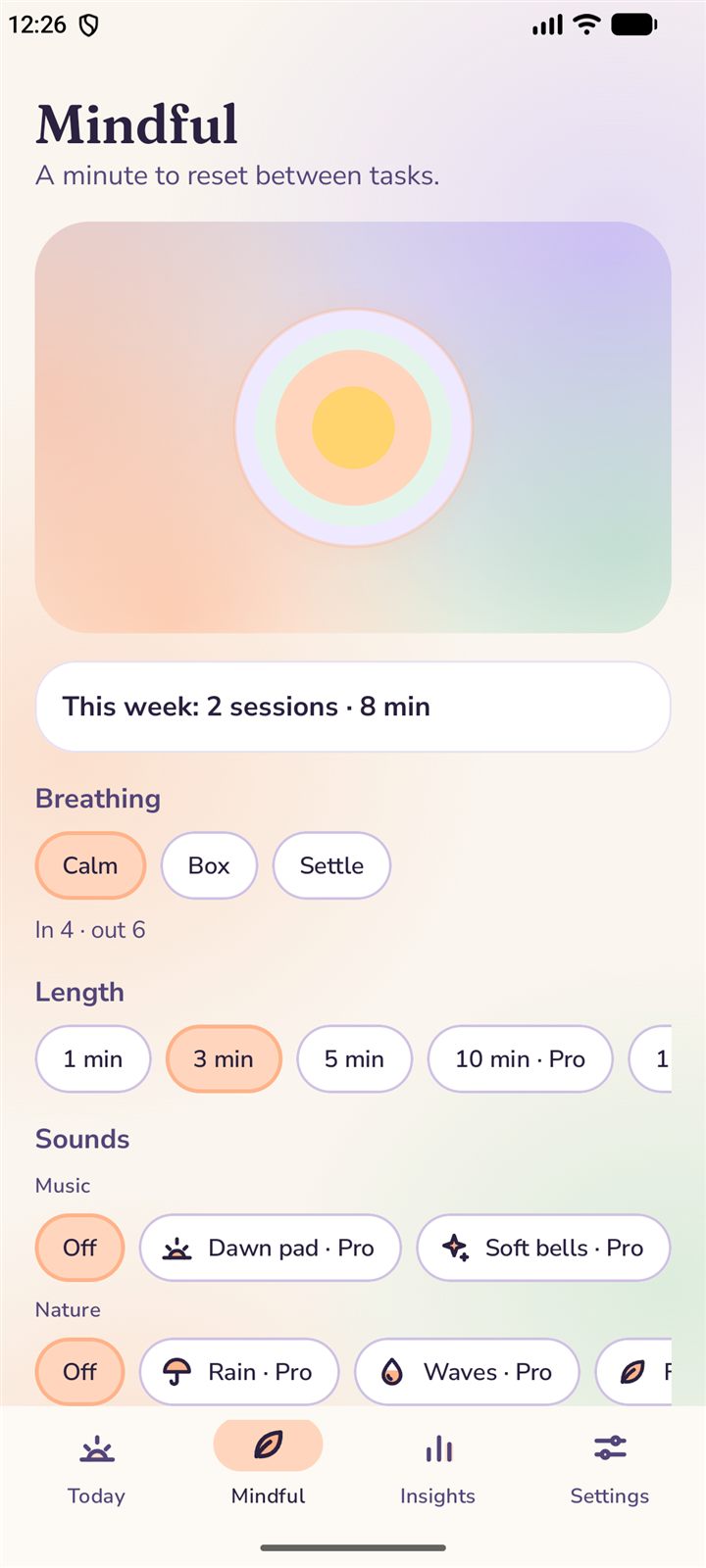
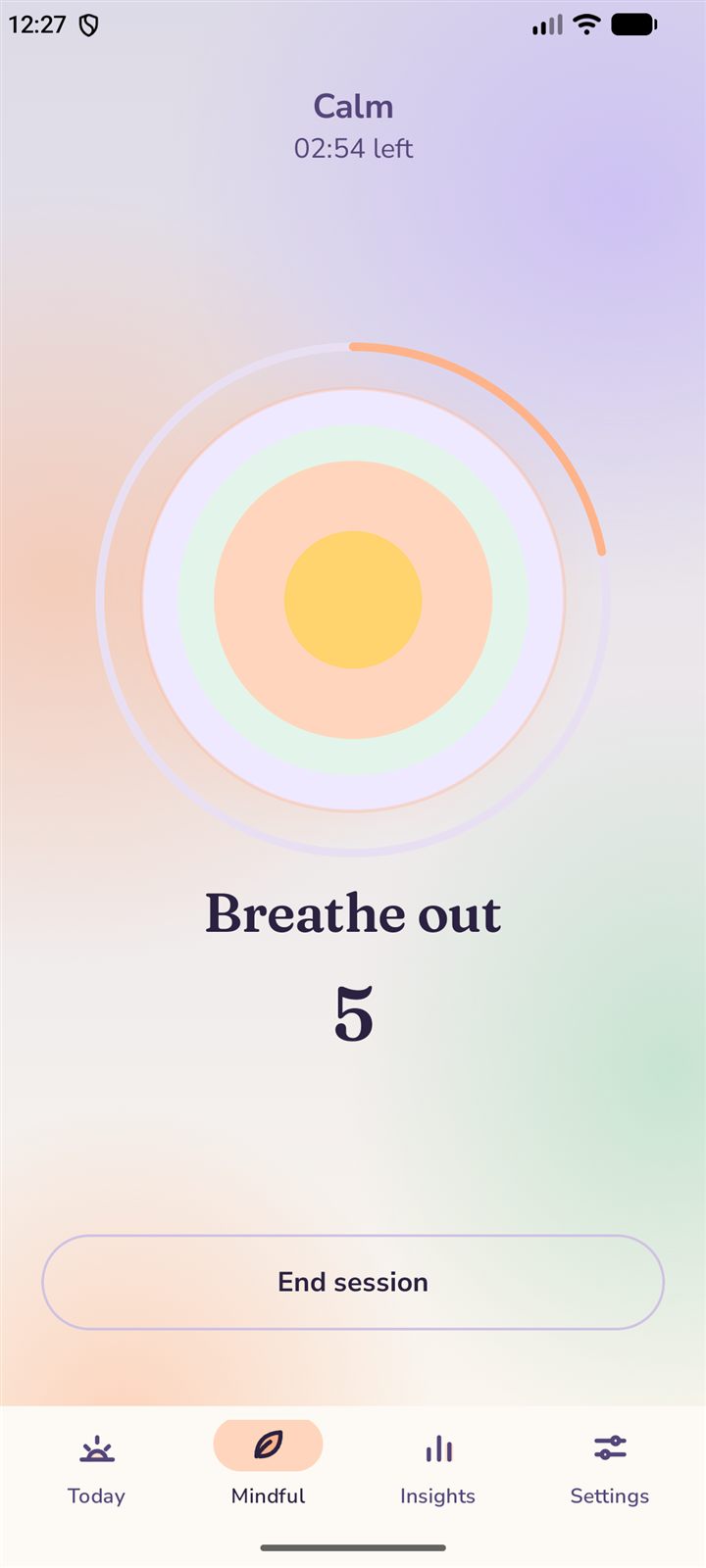
Guided breathing with three gentle patterns, a sun that moves with your breath and a count you can follow. Free, and every session counts toward your Balance. Pro adds music and nature sounds.
Calm
Box
Settle
10:20 PM
Your day belongs to you.
No account, no sign-in and no server of our own. Your shifts, breaks and places stay on your phone. Back up to a file you control, and clear everything with one tap. Even the colours follow your sky.
No account
No ads
On your device
7:45
Good morning
Friday, 2 October
On shift
10:00 AM – 6:00 PM · 8h
remaining
Started10:00 AM
Ends6:00 PM
Worked0m
Look after yourself
Where are you today?
This week32h 7mof 40h target
Last shift7h 54m06:22 PM
History
WeekMonth
Mindful
A minute to reset between tasks.
Breathe in
This week: 2 sessions · 8 min
Breathing
In 4 · out 6
Length
Sounds
Insights
27 Sep – 3 Oct
Worked32h 7m
of 40h target7h 53m behind
S
M
T
W
T
F
S
Average day8h 2m
Longest day8h 12m
Breaks2h 30m
Overtime18m
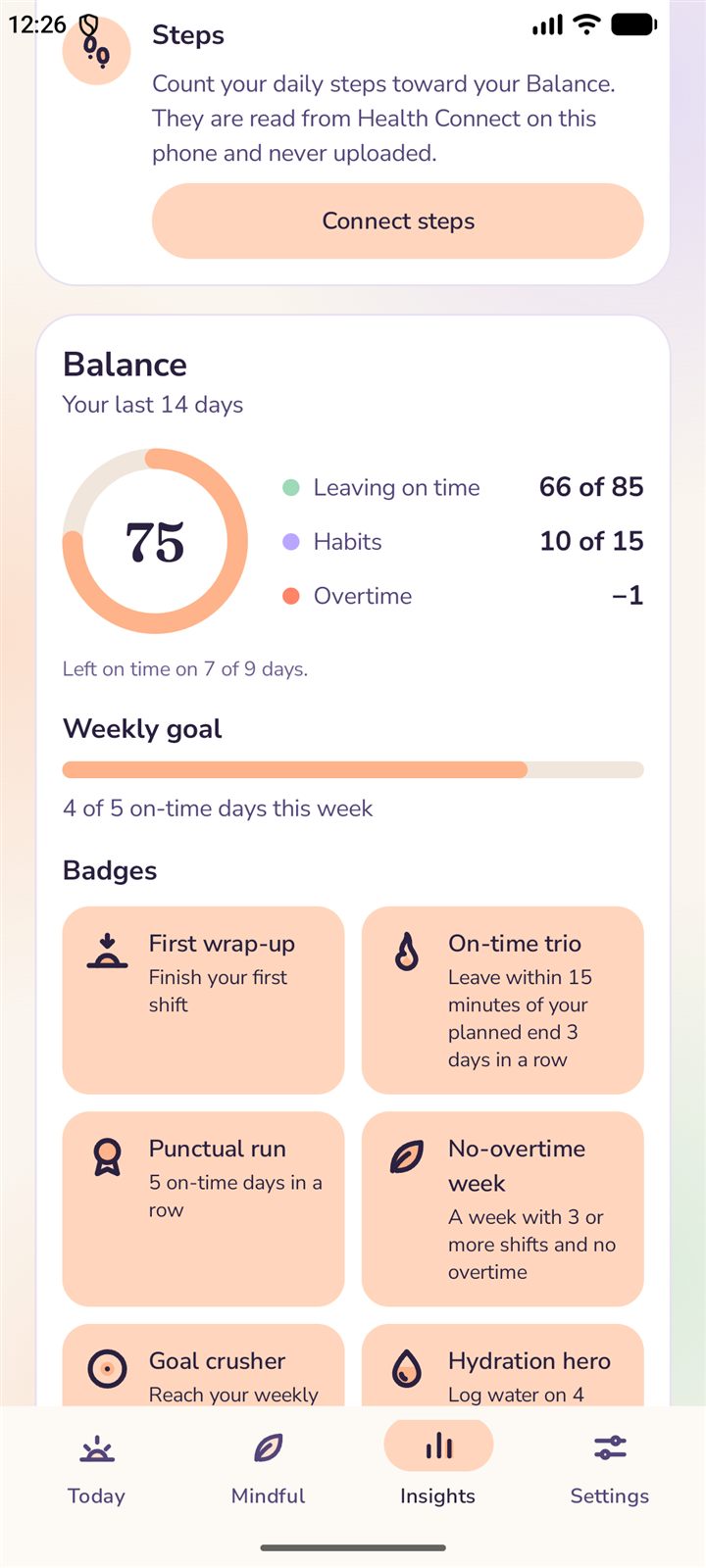
75
Balance
Your last 14 days. Left on time on 7 of 9 days.
Settings
Appearance
Auto follows the sun. Try Dark. This page changes with it.
Reminders
Morning reminderOn working days
15-minute warningBefore your day ends
WaterGentle, while you work
Your data
Stays on this phone
Back up to a file
Export timesheet (CSV)
Clear all data
When did you start?
Punch in at a time that has already passed. Your countdown and finish time follow it.
What kind of break?
Your finish time moves later by the same amount.
This is the real design, running. Tap Punch in, take a break, switch tabs. While you scroll, the day moves the clock.
Your planned day10:00 – 6:00
Counting from10:00 AM
Finish time6:00 PM
Worked so far35m
Finishing at6:00 PM
Finish moved to6:15 PM
On break15m
Worked this week32h 7m
Balance75
PatternCalm
This week2 sessions
AccountNone needed
StoredOn this phone
Features
Built around how work really goes.
Breaks move your finish time
Take a break and your end of day shifts by the same amount. No sums, no edits.
WorkLunchWork
6:00 PM
10:001:006:00
One tap, from anywhere
App, notification, widget or Quick Settings tile.
Punch Assist · now
On shift · done at 6:01 PMTime remaining 5:36:10
BreakPunch out
Insights that earn their place
Hours against target, longest day, breaks and overtime.
Office or home, noticed for you
Optional. Once, when you punch in. Never in the background.
OfficeHomeHybrid
A private Balance score
Leaving on time, overtime and habits, worked out on your phone.
75
Gentle habits
Water and walk reminders, only when you switch them on.
WaterWalkMindful
Yours to keep
Back up to a file you control and restore any time. Export your hours to CSV for timesheets with Pro. Everything stays on your device until you decide otherwise.
punch-assist-backup.jsontimesheet-october.csv
The real screens
Straight from the phone.
On shiftA calm countdown and a sun that crosses the sky.
What kind of break?Lunch, personal or just a break.
On breakPaused, with the finish time already moved.
Started earlier?Punch in at a time that has already passed.
Pick a timeTwo smooth wheels instead of a clock dial.
InsightsHours against your target, day by day.
BalanceA private score for leaving on time and looking after yourself.
MindfulA minute to reset between tasks.
Guided breathingFollow the orb, the words and the count.
HistoryEvery shift is kept, week or month.
Private by design
Your hours belong to you.
Punch Assist has no account, no sign-in and no server of its own. What you record stays on your phone, and we say plainly what little can leave it.
0Ads
0Trackers
0Accounts
100%On your device
Stays on your phone
Shifts, breaks and working hours
Your name, if you add one
Habit and Mindful counts
Office and Home places, if you save them
Balance score and badges
What can leave it
Crash reports to Google Firebase Crashlytics, optional and switchable in Settings. Never your times, name or places.
Purchases and tips, handled entirely by Google Play.
Steps, only if you connect Health Connect. They are read on your phone and never stored or sent.
Punch in and out from the app, notification, widget and tile
Breaks that move your finish time
Started earlier and forgot-to-punch-out fixes
History, week view and weekly insights
Reminders, water and walk habits
Balance score, badges and guided breathing
Back up and restore
Pro
Depth, exports and calm sounds.
Month and year insights
Office days tracker for hybrid work
CSV export for timesheets
Music and nature sounds for Mindful
10 and 15 minute sessions
A yearly plan or a one-time purchase, billed through Google Play. You can manage or cancel a subscription there at any time.
Questions, answered.
Does it need an account or internet?
No. Punch Assist works fully offline and has no sign-in. Google Play is used only for purchases, and crash reports (optional) need a connection.
What if I forget to punch in or out?
For a missed punch-in, choose "Started earlier?" and pick when you really began. For a missed punch-out, tap Punch out and tell the app when you finished. You can also add or fix any shift from History.
How do breaks work?
A break pauses your work and moves your finish time later by the same amount, so lunch is never counted as lateness. Resume and the countdown carries on from where it paused.
Is my location tracked?
No. If you save Office and Home places and turn on Smart Mode, the app checks your location once, at the moment you punch in, while it is open. It never tracks you in the background.
Can I move to a new phone?
Yes. Back up to a file in Settings and restore it on the new phone. Android may also carry your shift history across through its own backup. Pro follows your Google account.